---
URL: "/zh-CN/blog/2024-09/miniprogram_timeline.html"
LLMS_URL: "/zh-CN/blog/2024-09/miniprogram_timeline.md"
lastUpdated: true
commentabled: true
recommended: true
title: "微信小程序时间轴组件"
description: "微信小程序时间轴组件"
date:
pageClass: "blog-page-class"
---
---
lastUpdated: true
commentabled: true
recommended: true
title: 微信小程序时间轴组件
description: 微信小程序时间轴组件
date: 2024-09-26 15:18:00
pageClass: blog-page-class
---
# 微信小程序时间轴组件 #
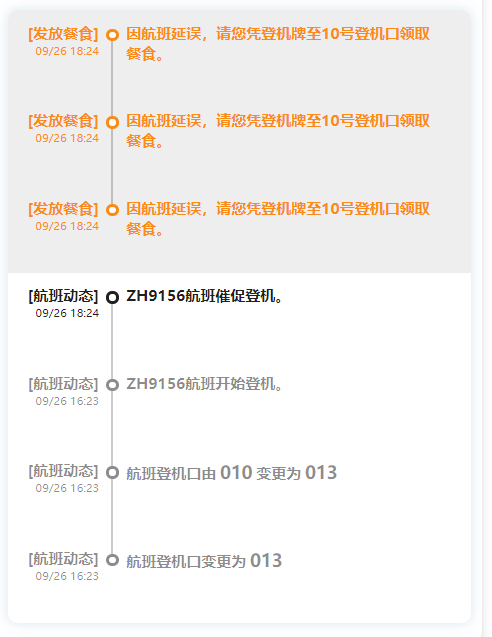
## WXML ##
```html
[{{item['title']}}]
{{item['time']}}
航班登机口由{{indexofStr.splits(item['message'],'-')[1]}}变更为{{indexofStr.splits(item['message'],'-')[3]}}
航班登机口变更为{{indexofStr.splits(item['message'],'-')[1]}}
{{item['message']}}
module.exports.includes = function (str, str_) {
return str.indexOf(str_) > -1;
}
module.exports.splits = function (str, str_) {
return str.split(str_);
}
```
## LESS ##
```less
.timeline {
border-radius: 16rpx;
.timeline-item {
padding-left: 150rpx;
padding-right: 48rpx;
padding-top: 48rpx;
font-size: 24rpx;
color: rgba(0, 0, 0, 0.45);
font-weight: bold;
position: relative;
.timeline-dot {
width: 9rpx;
height: 9rpx;
border: 6rpx solid rgba(0, 0, 0, 0.45);
background-color: #fff;
border-radius: 100%;
position: absolute;
top: 30rpx;
left: 152rpx;
}
.timeline-sep {
position: absolute;
width: 2rpx;
height: 136rpx;
top: 0;
left: 161rpx;
background-color: rgba(0, 0, 0, 0.2);
}
.timeline-item-content {
height: 90rpx;
margin: 0 0 0 10rpx;
position: relative;
.timeline-item-content_left {
position: absolute;
left: -130rpx;
top: -28rpx;
text-align: right;
// .title {
// color: #666;
// }
.time {
font-size: 18rpx;
font-weight: normal !important;
}
}
.timeline-item-content_right {
position: absolute;
top: -28rpx;
left: 24rpx;
.gate_number {
margin: 0 6rpx;
font-size: 28rpx;
font-weight: bold;
}
}
}
}
.timeline-item:first-child,
.timeline-item.highlight+view.timeline-item:not(.highlight) {
color: rgba(0, 0, 0, 0.88);
border-radius: 16rpx 16rpx 0 0;
.timeline-dot {
border: 6rpx solid rgba(0, 0, 0, 0.88);
}
.timeline-sep {
height: 106rpx;
top: 30rpx;
}
}
.timeline-item.highlight {
background-color: #EEEEEE;
color: #FA8C16;
.timeline-dot {
border: 6rpx solid #FA8C16;
}
.timeline-sep {
background-color: var(--highlight-sep);
}
}
.timeline-item:last-child {
.timeline-sep {
height: 30rpx;
}
// border-radius: 0 0 16rpx 16rpx;
}
.timeline-item:first-child:last-child {
.timeline-sep {
height: 0;
}
// border-radius: 16rpx;
}
}
```
## TypeScript ##
```ts
/*可视化地呈现时间流信息*/
Component({
options: {
multipleSlots: true // 在组件定义时的选项中启用多slot支持
},
properties: {
activities: { // 时间轴列表
type: Array,
value: []
},
shape: { // 时间轴形状
type: String,
value: 'circle' // circle | square
},
ordinal: { // 高亮模式显示分隔线
type: Boolean,
value: true
},
},
lifetimes: {
attached() {
// 是否倒序排列操作数据
const {reverse, activities} = this.data
if (!reverse) return
this.setData({
activities: activities.reverse()
})
}
}
})
export interface TimelineItem
{
message: string;
time: string;
title: string;
higlight?:boolean
}
```
## 使用 ##
```html
```