---
URL: "/zh-CN/blog/2023-07/weapp_canvas_radar.html"
LLMS_URL: "/zh-CN/blog/2023-07/weapp_canvas_radar.md"
lastUpdated: true
commentabled: true
recommended: false
title: "给小程序添加一个评分分值分布雷达图,完善评价体系"
description: "给小程序添加一个评分分值分布雷达图,完善评价体系"
poster: "/images/cmono-%E5%BE%AE%E4%BF%A1%E5%9B%BE%E7%89%87_20230717155014.jpg"
date: "2023-07"
---
---
lastUpdated: true
commentabled: true
recommended: false
title: 给小程序添加一个评分分值分布雷达图,完善评价体系
description: 给小程序添加一个评分分值分布雷达图,完善评价体系
poster: /images/cmono-%E5%BE%AE%E4%BF%A1%E5%9B%BE%E7%89%87_20230717155014.jpg
date: 2023-07
---
# 给小程序添加一个评分分值分布雷达图,完善评价体系 #
## 背景 ##
最近平台上线了评价功能,支持对服务人员进行评价,那么后台如何统计和直观展示评价呢。
如何搭建完整的评价体系呢?
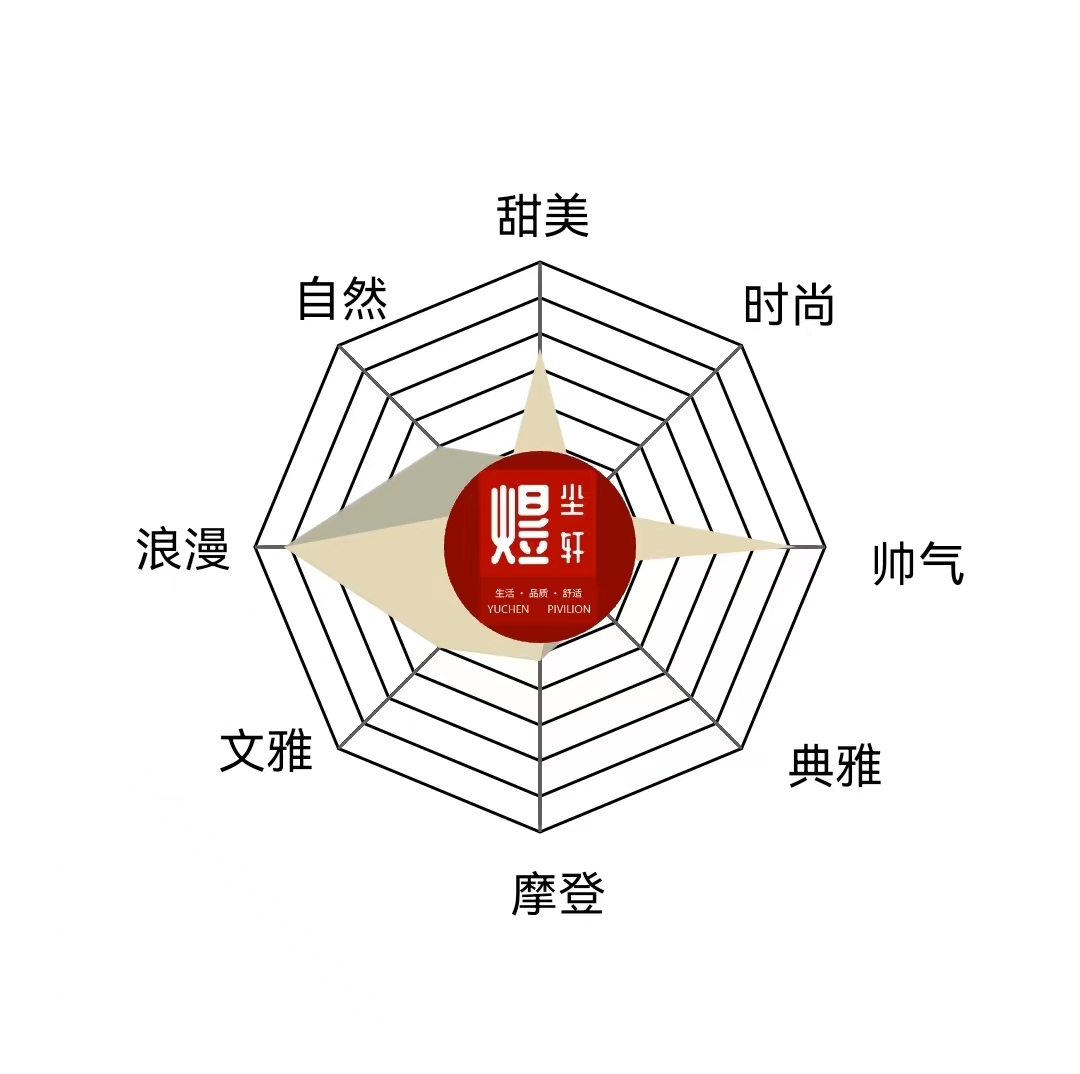{data-zoomable}
## WXML ##
```xml
```
## LESS ##
```less
.canvas-container {
margin: 0 auto;
width: 100vw;
height: 100vh;
.poster-canvas {
margin: 0 auto;
position: absolute;
top: 0;
left: 0;
// left: 50%;
// transform: translateX(-50%);
}
}
```
## TypeScript ##
```typescript
import Wechat from "~/utils/wechat";
const { pixelRatio, windowHeight, windowWidth } = wx.getSystemInfoSync();
const mdData = [['甜美', 30], ['时尚', 20], ['帅气', 20], ['典雅', 30], ['摩登', 40], ['文雅', 50], ['浪漫', 90], ['自然', 50]]; //内心
const mdData2 = [['甜美', 70], ['时尚', 20], ['帅气', 90], ['典雅', 10], ['摩登', 40], ['文雅', 50], ['浪漫', 90], ['自然', 20]]; //外在
let mData: any = [];
let mData2: any[] = [];
const mCount = mdData.length; //边数
let mCenter: any = ''; //中心点
let mRadius: any = ''; //半径(减去的值用于给绘制的文本留空间)
const mAngle = Math.PI * 2 / mCount; //角度
const mColorPolygon = '#000000'; //多边形颜色
const mColorLines = '#5e5e5e'; //伞骨颜色
const mColorText = '#000000'; //文字颜色
let Interval = 0;
let lineInterval = 0;
const totalTime = 1000; //总执行时间
const spaceTime = 10; //每隔多久执行一次
const speed = spaceTime / totalTime; //每执行一次完成的进度百分比
let precent = 0; //当前完成的进度百分比
let precent2 = 0;
let lineprecent = 0;
const outColor = 'rgba(183, 179, 156, 0.8) ';
const innerColor = 'rgba(228, 215, 182, 0.8) ';
let canvas1: any = null;
let canvas2: any = null;
let canvas3: any = null;
let canvas4: any = null;
let canvas5: any = null;
Page({
/**
* 页面的初始数据
*/
data: {
},
/**
* 生命周期函数--监听页面加载
*/
onLoad() {
const _self = this
// // 创建画布
// canvas.create({
// query: '.poster-canvas', // 必传,canvas元素的查询条件
// rootWidth: 750, // 参考设备宽度 (即开发时UI设计稿的宽度,默认375,可改为750)
// bgColor: '#fff', // 背景色,默认透明
// component: this, // 自定义组件内需要传 this
// radius: 16 // 海报图圆角,如果不需要可不填
// })
// canvas.draw({
// series: [
// {
// type: Text,
// text: 'Hello World',
// fontSize: 30
// },
// {
// type: Arc,
// x: 300,
// y: 450,
// r: 200,
// start: 0,
// end: Math.PI * 1.5,
// reverse: false,
// lineStyle: {
// dash: [15, 15],
// width: 10,
// color: '#09f'
// },
// zIndex: 0
// },
// {
// type: Arc,
// x: 300,
// y: 450,
// r: 100,
// start: 0,
// end: Math.PI * 0.5,
// reverse: true,
// lineStyle: {
// dash: [15, 15],
// width: 10,
// color: '#0ff'
// },
// zIndex: 0
// }
// ]
// })
var m = [];
for (var i = 0; i < mCount; i++) {
m[(i + 6) % mCount] = mdData[i];
}
mData = m; //内在
var m2 = [];
for (var i = 0; i < mCount; i++) {
m2[(i + 6) % mCount] = mdData2[i];
}
mData2 = m2; //外在
mCenter = Math.floor(Math.min(windowWidth, windowHeight) / 2); //中心点
mRadius = mCenter - 85; //半径(减去的值用于给绘制的文本留空间)
Promise.all([
_self.initCanvas('#radarcanvas1'),
_self.initCanvas('#radarcanvas2'),
_self.initCanvas('#radarcanvas3'),
_self.initCanvas('#radarcanvas4'),
_self.initCanvas('#radarcanvas5'),
]).then((canvasArr) => {
canvas1 = canvasArr[0]
canvas2 = canvasArr[1]
canvas3 = canvasArr[2]
canvas4 = canvasArr[3]
canvas5 = canvasArr[4]
_self.initRadarCanvas(); //雷达图文字+边框
_self.clickCanvas(); //调用画雷达图
})
},
/**
* 生命周期函数--监听页面初次渲染完成
*/
onReady() {
},
/**
* 生命周期函数--监听页面显示
*/
onShow() {
},
/**
* 生命周期函数--监听页面隐藏
*/
onHide() {
},
/**
* 生命周期函数--监听页面卸载
*/
onUnload() {
},
/**
* 页面相关事件处理函数--监听用户下拉动作
*/
onPullDownRefresh() {
},
/**
* 页面上拉触底事件的处理函数
*/
onReachBottom() {
},
/**
* 用户点击右上角分享
*/
onShareAppMessage() {
},
initCanvas(canvasId: string) {
const _self = this
return new Promise((resolve, reject) => {
wx.createSelectorQuery().in(_self)
.select(canvasId).fields({ node: true, size: true, context: true }).exec(res => {
const canvas = res[0].node
canvas.width = res[0].width * pixelRatio
canvas.height = res[0].height * pixelRatio
const context = canvas.getContext('2d')// as CanvasRenderingContext2D
context.scale(pixelRatio, pixelRatio)
resolve(canvas)
})
})
},
clearAll() {
// canvas1.getContext('2d')?.clearRect(0, 0, mW, mH);
canvas2.getContext('2d')?.clearRect(0, 0, windowWidth, windowHeight);
canvas3.getContext('2d')?.clearRect(0, 0, windowWidth, windowHeight);
canvas4.getContext('2d')?.clearRect(0, 0, windowWidth, windowHeight);
canvas5.getContext('2d')?.clearRect(0, 0, windowWidth, windowHeight);
},
//画雷达
clickCanvas: function () {
var that = this;
precent = 0;
precent2 = 0;
lineprecent = 0;
clearInterval(Interval);
clearInterval(lineInterval);
that.clearAll()
lineInterval = setInterval(function () { //渐进画伞骨
if (lineprecent <= 1) {
that.drawLines(canvas2);
} else {
clearInterval(lineInterval);
}
}, spaceTime - 20);
setTimeout(function () { //渐进画数据区域块
Interval = setInterval(function () {
if (precent <= 1) {
that.drawRegion(canvas3, outColor);
that.drawRegion2(canvas4, innerColor);
} else {
clearInterval(Interval);
}
}, spaceTime - 20);
}, 10);
that.drawPhoto(canvas5);
},
initRadarCanvas: function () {
var that = this;
precent = 0;
lineprecent = 0;
that.drawPolygon(canvas1); //画伞架
that.drawText(canvas1); //画文字
},
// CanvasRenderingContext2D
drawPhoto(canvas: any) {
const context = canvas.getContext('2d')// as CanvasRenderingContext2D
// context.scale(dpr, dpr)
context.save();
const x = mCenter - 32;
const y = mCenter - 32;
const r = 32
const d = r * 2;
context.beginPath();
context.arc(x + r, y + r, r, 0, 2 * Math.PI);
context.clip();
const image = canvas.createImage();
image.src = '../../assets/images/ycx_cover.png'
image.onload = function () {
wx.logger.debug('开始绘制')
context.drawImage(image, x, y, d, d);
// context.drawImage(image, 0, 0, 144, 144)
wx.logger.debug('结束绘制')
}
// wx.getImageInfo({
// src: '../../assets/images/brand.png',
// success(res) {
// context.drawImage(res.path, x, y, d, d);
// context.stroke()
// // 将Canvas绘制出来
// context.draw()
// }
// })
},
// 绘制多边伞架
drawPolygon: function (canvas: any) {
const ctx = canvas.getContext('2d')// as CanvasRenderingContext2D
// ctx.scale(dpr, dpr)
ctx.save();
ctx.strokeStyle = mColorPolygon;
// ctx.setStrokeStyle(mColorPolygon);
var r = mRadius / mCount; //单位半径
//画8个圈
for (var i = 0; i < mCount; i++) {
ctx.beginPath();
var currR = r * (i + 1); //当前半径
//画8条边
for (var j = 0; j < mCount; j++) {
var x = mCenter + currR * Math.cos(mAngle * j);
var y = mCenter + currR * Math.sin(mAngle * j);
ctx.lineTo(x, y);
}
ctx.closePath()
ctx.stroke();
//ctx.draw(0, 0, 500, 500);
}
ctx.restore();
},
//绘制伞骨
drawLines: function (canvas: any) {
const ctx = canvas.getContext('2d')// as CanvasRenderingContext2D
// ctx.scale(dpr, dpr)
ctx.save();
ctx.beginPath();
ctx.strokeStyle = mColorLines;
for (var i = 0; i < mCount; i++) {
var x = mCenter + mRadius * Math.cos(mAngle * i) * lineprecent;
var y = mCenter + mRadius * Math.sin(mAngle * i) * lineprecent;
ctx.moveTo(mCenter, mCenter);
ctx.lineTo(x, y);
}
ctx.stroke();
var oldPrectet = lineprecent;
lineprecent = lineprecent + speed;
if (oldPrectet < 1 && lineprecent > 1) {
lineprecent = 1;
}
ctx.restore();
},
//绘制顶点文本
drawText: function (canvas: any) {
const ctx = canvas.getContext('2d')// as CanvasRenderingContext2D
// ctx.scale(dpr, dpr)
ctx.save();
const fontSize = 16;
ctx.font = fontSize + 'px AlibabaPuHuiTiMedium';
ctx.fillStyle = mColorText
for (var i = 0; i < mCount; i++) {
var x = mCenter + mRadius * Math.cos(mAngle * i);
var y = mCenter + mRadius * Math.sin(mAngle * i);
//通过不同的位置,调整文本的显示位置
if (mAngle * i >= 0 && mAngle * i < Math.PI / 2) {
ctx.fillText(mData[i][0], x + 15, y + fontSize - 5);
} else if (mAngle * i == Math.PI / 2) {
ctx.fillText(mData[i][0], x - 10, y + fontSize + 10);
} else if (mAngle * i > Math.PI / 2 && mAngle * i <= Math.PI) {
ctx.fillText(mData[i][0], x - 40, y + fontSize - 10);
} else if (mAngle * i > Math.PI && mAngle * i <= Math.PI * 3 / 2) {
ctx.fillText(mData[i][0], x - 15, y - 10);
} else {
ctx.fillText(mData[i][0], x, y - 8);
}
}
ctx.restore();
},
//绘制数据区域 外在
drawRegion: function (canvas: any, fillColor: string) {
const ctx = canvas.getContext('2d')// as CanvasRenderingContext2D
// ctx.scale(dpr, dpr)
ctx.save();
ctx.beginPath();
for (var i = 0; i < mCount; i++) {
var x = mCenter + mRadius * Math.cos(mAngle * i) * mData[i][1] / 100 * precent;
var y = mCenter + mRadius * Math.sin(mAngle * i) * mData[i][1] / 100 * precent;
ctx.lineTo(x, y);
}
ctx.closePath();
ctx.save();
ctx.fillStyle = fillColor;
ctx.fill();
// ctx.draw(0, 0, 500, 500);
var oldPrectet = precent;
precent = precent + speed;
if (oldPrectet < 1 && precent > 1) {
precent = 1;
}
ctx.restore();
},
//绘制数据区域2 内心
drawRegion2: function (canvas: any, fillColor: string) {
const ctx = canvas.getContext('2d')// as CanvasRenderingContext2D
// ctx.scale(dpr, dpr)
ctx.save();
ctx.beginPath();
for (var i = 0; i < mCount; i++) {
var x = mCenter + mRadius * Math.cos(mAngle * i) * mData2[i][1] / 100 * precent2;
var y = mCenter + mRadius * Math.sin(mAngle * i) * mData2[i][1] / 100 * precent2;
ctx.lineTo(x, y);
}
ctx.closePath();
ctx.save();
ctx.fillStyle = fillColor;
ctx.fill();
var oldPrectet = precent2;
precent2 = precent2 + speed;
if (oldPrectet < 1 && precent2 > 1) {
precent2 = 1;
}
ctx.restore();
}
})
```